
SiteLock Website Security – Advanced Protection for Your Website
Dhaka Web Host Ltd provides SiteLock website security to ensure complete website security against malware, phishing attacks, hackers, and other cyber security threats. SiteLock is a globally trusted security service designed to protect business websites through automated malware scanning, vulnerability scanner monitoring, firewall protection, and professional malware removal.
With increasing cyber security risks in Bangladesh and worldwide, having an active internet security solution is no longer optional. SiteLock continuously scans your website files, applications, and databases to detect malware before it damages your reputation or affects your visitors.
Common Website Security Threats You Must Know
Malware (Malicious Software)
Malware refers to software designed to damage, exploit, or take control of a system. Without malware scanning and detection, an infected site may redirect visitors, display unwanted ads, or leak confidential information.
Phishing Attacks
Phishing tricks your users into revealing sensitive information like passwords or payment details. Using strong authentication and advanced monitoring helps defend against such threats.
Vulnerabilities and Backdoors
Sites with outdated plugins or poor configurations may have weak points that hackers exploit. A proactive vulnerability scanner can help identify risks before attacks happen.
Website Security Services Every Site Needs
Malware Scanning & Detection
Regular malware scanning is critical to finding hidden threats before they become serious problems. A comprehensive malware scan checks all files and scripts for suspicious code.
Firewall & Network Security
A web application firewall (WAF) protects your site from malicious traffic and common attacks like SQL injection and cross-site scripting. Combined with network security monitoring, it forms your first line of defense.
Virus Scan & Removal
Automatic virus scanning identifies malicious files hidden in uploads or outdated components. Professional virus scan and removal ensures your site stays clean and trustworthy.
Malware Removal & Cleanup
If an infection is found, quick removal is essential. Many providers offer free malware removal for initial cleanup, followed by paid security services for ongoing protection.
What Is a Website Vulnerability Scanner?
A website vulnerability scanner is an automated security tool that detects weaknesses in your website’s code, plugins, themes, and server configuration. These vulnerabilities can be exploited by hackers to inject malware, steal data, or damage your brand reputation.
Modern website security solutions use vulnerability scanning to:
Detect outdated plugins and themes
Identify SQL injection risks
Find cross-site scripting (XSS) issues
Detect insecure configurations
Prevent unauthorized access
Dhaka Web Host Ltd integrates SiteLock website security to provide real-time vulnerability scanning, ensuring your website stays protected against emerging threats.
Regular scanning is essential for strong cyber security and long-term business protection.
How Malware Scanning Protects Your Website
Malware scanning continuously monitors your website files and database to detect malicious code before it spreads.
Without proper malware detection, your website can:
Get blacklisted by Google
Lose SEO rankings
Redirect visitors to phishing pages
Spread viruses to customers
Lose customer trust
With professional website security services, malware scanning works 24/7 to identify:
Backdoor scripts
Trojan infections
Suspicious file modifications
Spam injection attacks
Dhaka Web Host provides malware scanning and malware removal powered by SiteLock, helping businesses maintain strong internet security.
Key Benefits of SiteLock Website Security
1. Daily Malware Scanning & Malware Detection
SiteLock performs automatic malware scanning to identify malicious scripts, hidden malware, and injected code. Early malware detection prevents blacklisting by Google and protects your search rankings.
2. Automatic Malware Removal
If malware is detected, SiteLock offers instant malware removal to clean infected files and restore your website security. This reduces downtime and prevents data loss.
3. Web Application Firewall (WAF)
The built-in firewall filters harmful traffic before it reaches your server. This improves network security, blocks brute force attacks, and protects against DDoS attempts.
4. Vulnerability Scanner & Patch Management
The vulnerability scanner checks outdated plugins, themes, and CMS versions. Fixing these weaknesses strengthens overall security and reduces hacking risks.
5. Protection Against Phishing & Spam
SiteLock prevents phishing pages from being created on your website and blocks suspicious bot activity, improving internet security and user trust.
6. Trust Seal for Customer Confidence
Displaying a SiteLock security badge increases visitor confidence and helps improve conversions, especially for eCommerce and business websites.
Why Choose SiteLock Security from Us?
When combined with our reliable hosting services, SiteLock website security provides:
Continuous malware scanning
Professional malware removal
Advanced firewall protection
Real-time security monitoring
Complete cyber security support
You can integrate SiteLock with your hosting plan or enhance protection alongside our SSL Certificate services for encrypted and secure communication.
For maximum protection, you may also combine this with our
This layered security approach ensures complete website security, improved performance, and stronger cyber security resilience.
Check Out SiteLock
No more tension for your website being effected by malware
Protect your website from Malware and Virus
Our Speciality
Global top website security system. Helps you protect your website easily. Automatically removes malicious codes throughout daily scanning and keep your website threat free. Makes your website totally secured for users. Increase customer’s trust and confidence in your website and increase conversion rate.
Features of SiteLock
Here are the SiteLock features you need to know about
Site Scanning and malware detection
Daily malware scan detects any kind of threat and malware on your site and removes it automatically. After detecting malware, SiteLock will remove the malware content and keep your site secured.
Security against hacks
By updating apps automatically SiteLock keeps your website risk-free and secured. Additionally, TrueShield feature will block any kind of incoming cyber-attacks and hacking attempts.
QWASP and build visitor trust
As suggested by the Open Web Application Security Project, SiteLock maintains protection against security flaws. Gives visitor more positive experience by giving them smooth and risk free browsing
Strong Reputation
By doing the daily scan, SiteLock keeps your website clean and keeps your site away from blacklisting.
Effective CDN
Speeds up your website by global positioning. Serving your visitor from the closest server location from them and keep up the speed.
Easier and faster setup
The setup is easy and instant. So the users will not have to spend too much time setting up the system.
Free Website Security vs SiteLock vs Enterprise Protection
Choosing the right website security solution depends on your business size, risk level, and traffic volume. Below is a practical comparison to help you decide.
| Features | Free Security Tools | SiteLock Website Security | Enterprise Security Solution |
|---|---|---|---|
| Malware Scanning | Limited / Manual | Daily Automated Scanning | Real-time Continuous Monitoring |
| Malware Removal | Manual / Partial | Automatic Malware Removal | Advanced Incident Response |
| Vulnerability Scanner | Basic | Daily Vulnerability Scanning | Advanced Threat Intelligence |
| Firewall Protection | Not Included | Web Application Firewall | Enterprise-grade Firewall |
| Phishing Detection | Limited | Yes | Advanced Anti-Phishing System |
| Blacklist Monitoring | No | Yes | Yes |
| DDoS Protection | No | Basic | Full Protection |
| Security Support | No Dedicated Support | Standard Support | Priority 24/7 Support |
| Best For | Personal Blogs | Small–Medium Business | Large Enterprise / High Traffic Sites |
SiteLock plans for you
- Daily malware scanning
- Number of pages scanned 5
- SiteLock Risk Score
- Automatic or Manual Scaning
- ...
- ...
- ...
- ...
- ...
- ...
- ...
- ...
- ...
- ...
- ...
- ...
- Daily malware scanning
- Number of pages scanned 25
- Daily Blacklist Monitoring
- SiteLock Risk Score
- Website Application Scan One-Time
- SQL Injection Scan One-Time
- Cross Site (XSS) Scan One-Time
- SiteLock Trust Shield
- ...
- ...
- ...
- ...
- ...
- ...
- ...
- ...
- Daily malware scanning
- Number of pages scanned 500
- Daily Blacklist Monitoring
- SiteLock Risk Score
- Website Application Scan Daily
- SQL Injection Scan Daily
- Cross Site (XSS) ScanDaily
- SiteLock Trust Shield
- Daily Smart Scans
- Automatic Malware Removal
- True Shield Protection
- Wordpress Scan
- Spam Blacklist Monitoring
- ...
- ...
- ...
- Daily malware scanning
- Number of pages scanned 500
- Daily Blacklist Monitoring
- SiteLock Risk Score
- Website Application Scan Daily
- SQL Injection Scan Daily
- Cross Site (XSS) ScanDaily
- SiteLock Trust Shield
- Daily Smart Scans
- Automatic Malware Removal
- True Shield Protection
- Wordpress Scan
- Spam Blacklist Monitoring
- Web Application Firewall
- Global CDN
- Content Acceleration
Why Website Security Matters for Your Business
Website security is essential in protecting your website, data, and customers from modern cyber threats such as phishing, malware infections, and network attacks. Every second your website remains vulnerable increases the risk of data breaches and reputational damage.
Hackers target vulnerabilities in code, plugins, or server configurations. Without proper website security practices and monitoring, even small business websites can become compromised.
Good security safeguards your:
Business reputation
Customer data
Search engine rankings
Revenue streams

Benefits of Proactive Website Security
Prevents unauthorized access
Stops sensitive data leakage
Protects user trust and loyalty
Reduces risk of SEO penalties from hacked content
Lowers support drop-off and bounce rates
Ensures compliance with industry security standards
Tips to Reduce Your Security Risk
Here are practical practices every website owner should adopt:
✔ Keep CMS, plugins, and themes up to date
✔ Use strong, unique passwords with 2FA
✔ Regularly backup your website
✔ Implement HTTPS and SSL
✔ Use trusted plugins and extensions
✔ Follow a regular scanning schedule
Metrics That Matter: Uptime + Security
Good security means not only stopping attacks, but monitoring uptime and performance. Many modern security platforms include:
- Scheduled malware scans
- Real-time attack alerts
- Automated firewall rules
- Behavioral anomaly detection
This proactive approach helps prevent issues before they affect your users.
SiteLock Website Security – What You Get
SiteLock website security is a premium protection system designed to prevent and remove threats automatically.
When you activate SiteLock with Dhaka Web Host Ltd, you receive:
✔ Daily malware scanning
✔ Automatic malware removal
✔ Website vulnerability scanning
✔ Firewall protection
✔ Blacklist monitoring
✔ Spam & phishing detection
SiteLock acts as an advanced security service, protecting your website from cyber attacks, malware, and hacking attempts.
It is one of the most trusted website security solutions for businesses in Bangladesh.
Free Malware Removal vs Professional Malware Removal
Many website owners search for free malware removal, but free tools often:
Miss hidden infections
Do not provide firewall protection
Fail to detect deep-level malware
Do not prevent reinfection
Professional malware removal services, like SiteLock, not only clean infections but also:
Fix vulnerabilities
Block future attacks
Monitor files continuously
Provide ongoing website security
If your website is already infected, relying only on free virus scan tools may not be enough.
How Firewall Protection Strengthens Website Security
A firewall acts as a protective barrier between your website and cyber threats.
It helps block:
Brute force login attempts
DDoS attacks
Bot traffic
SQL injection attacks
Suspicious IP addresses
Combining firewall protection with malware detection and vulnerability scanning creates layered cyber security — the strongest form of website protection.
How Website Security Impacts SEO Rankings
Google prioritizes secure websites. If your website contains malware or phishing content:
Google may display security warnings
Your website can be de-indexed
Organic traffic drops instantly
Brand credibility suffers
Strong website security protects your SEO investment.
By using SiteLock website security with Dhaka Web Host Ltd, businesses in Bangladesh can:
Prevent SEO penalties
Avoid blacklist warnings
Maintain search engine trust
Protect customer data
Security and SEO go hand in hand.
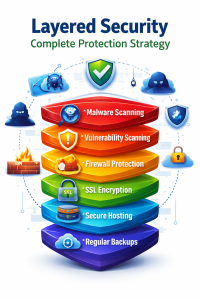
Layered Security: Complete Protection Strategy
The strongest website security strategy includes:
Malware scanning
Vulnerability scanning
Firewall protection
SSL encryption
Secure hosting environment
Regular backups
Dhaka Web Host Ltd provides integrated security services to help businesses stay protected against evolving cyber threats.
If your site got Hacked !!!
SiteLock emergency response will help you
If you are exposed to cyber-attack and your site is at risk of being compromised you should get an emergency response to quickly recover your site.
Fast and Quick response
Within 30 minute of malware detection, SiteLock will response quick analysis and start taking action.
Remove Malware
Automatic malware cleaning will be performed once the system detects any malicious content.
Repair Site
After the system detects the problem, It will automatically start recovering the website.
Aftercare for 7 days
After recovering the site, there will be continuous monitoring for 7 days to ensure further safety.
One time payment
The emergency service is one time payment. There is no need for recurring fees or subscription
Easy installing
Easy and instant installation. User friendly interface, easy to understand and easy to maintain
Real-time updates
The emergency system will keep on tracking real-time progression. Increase site viewer's positive experience
Risk free site
By using Emergency Response, your site will be risk free and kept away from blacklisting.
One time 16500 TK. for 7 days protection
Frequently Asked Question
What is SiteLock?
SiteLock is one of the most frequently used website security systems for defending websites from hacking, malware attacks, vulnerability, DDoS attacks. It is cloud-based security that keeps tracking threat information collected worldwide. Continuously keeps updating it’s protection method.
How long does it takes for activation?
SiteLock can be activated instantly once you complete your payment. As it is a cloud-based security system, it can be deployed as quickly as possible.
The subscription system is monthly or yearly?
SiteLock Find is based on yearly subscription. SiteLock Fix and SiteLock Defend is monthly subscription . Emergency Service is one-time subscription.
What does SiteLock do?
SiteLock works on real-time protection. Protects your website pages from being attacked by malware and suspicious content. Automatic malware removal removes any kind of thread when doing scheduled scans. Keeps blacklist monitoring. Works as a firewall for web applications.
Why do I need Web Security?
Every day, there is over millions of web attacks occurred worldwide. No website is too small or too large is to get hacked. Before it’s too late, you should always focus on early preparation. Web security software can provide the best solution to those troubles. That’s why we suggest you protect your website using premium security software.
Why do we need website backup?
Website backup means that you can have a similar copy of your content and data with you. Whenever your website gets corrupted, the important data will be available to you. You can use it to restore the website back to its previous state immediately.
What if my site is hacked already?
If your website is already hacked or compromised. The best way to save your important data is to recover your site. If you already have a previous backup, you can try restoring your site using that backup. Otherwise, you can use ‘Emergency Service’ from SiteLock.
What if my site got an issue?
Once there is an issue found on your site. SiteLock will immediately mail you regarding the issue.